Connect
Point the client at your server with cctrace init, restart your agent, and confirm collection with cctrace status.
Before you start
- The server is running and you know two addresses: the sync endpoint (HTTP, port 8080 by default) and the OTEL endpoint (gRPC, port 4317 by default). See Ports.
- An administrator has created your account. See Users.
- You have signed in to the dashboard once and replaced the temporary password. The server refuses CLI authentication while a temporary password is pending, and
initstops withplease change your password on the dashboard before authenticating. - Your account has a team.
inittakes your name, email, and team from the server and fails validation if any of them is empty.
Run init
cctrace init
init asks for the following, in this order:
| Prompt | What to enter |
|---|---|
Sync endpoint |
The server's HTTP address, for example https://cctrace.company.example. A bare host:port gets http:// prepended. |
OTEL endpoint |
The server's OTLP gRPC address, for example http://cctrace.company.example:4317. |
CA certificate file (PEM) |
Asked only when either endpoint is https://. The root certificate of a private CA, such as the one exported in Install the server. Give it even if the OS keychain already trusts that CA: Claude Code takes it from NODE_EXTRA_CA_CERTS (over http/protobuf; see Claude Code) and Codex from its own configuration, both written by cctrace from this file, and whether the keychain alone is enough for them was not tested. Leave empty for a publicly trusted certificate (cctrace keeps the system roots; not tested with Codex). Type none to remove a stored CA; with both endpoints on http:// a stored CA is removed without asking. Stored as server.ca_cert_file. |
User ID |
Your cctrace user ID. If you type an email address, the part after @ is dropped. |
Temporary password |
Your current dashboard password (the one you set after the first sign-in). Input is hidden. Three attempts. |
Enable session log sync? (y/n) |
y (default) installs the Claude Code hooks that start the sync daemon. n leaves telemetry on and session logs off. |
Create a read token for analysis commands |
Only needed for the read commands, which are under active development. n is fine. |
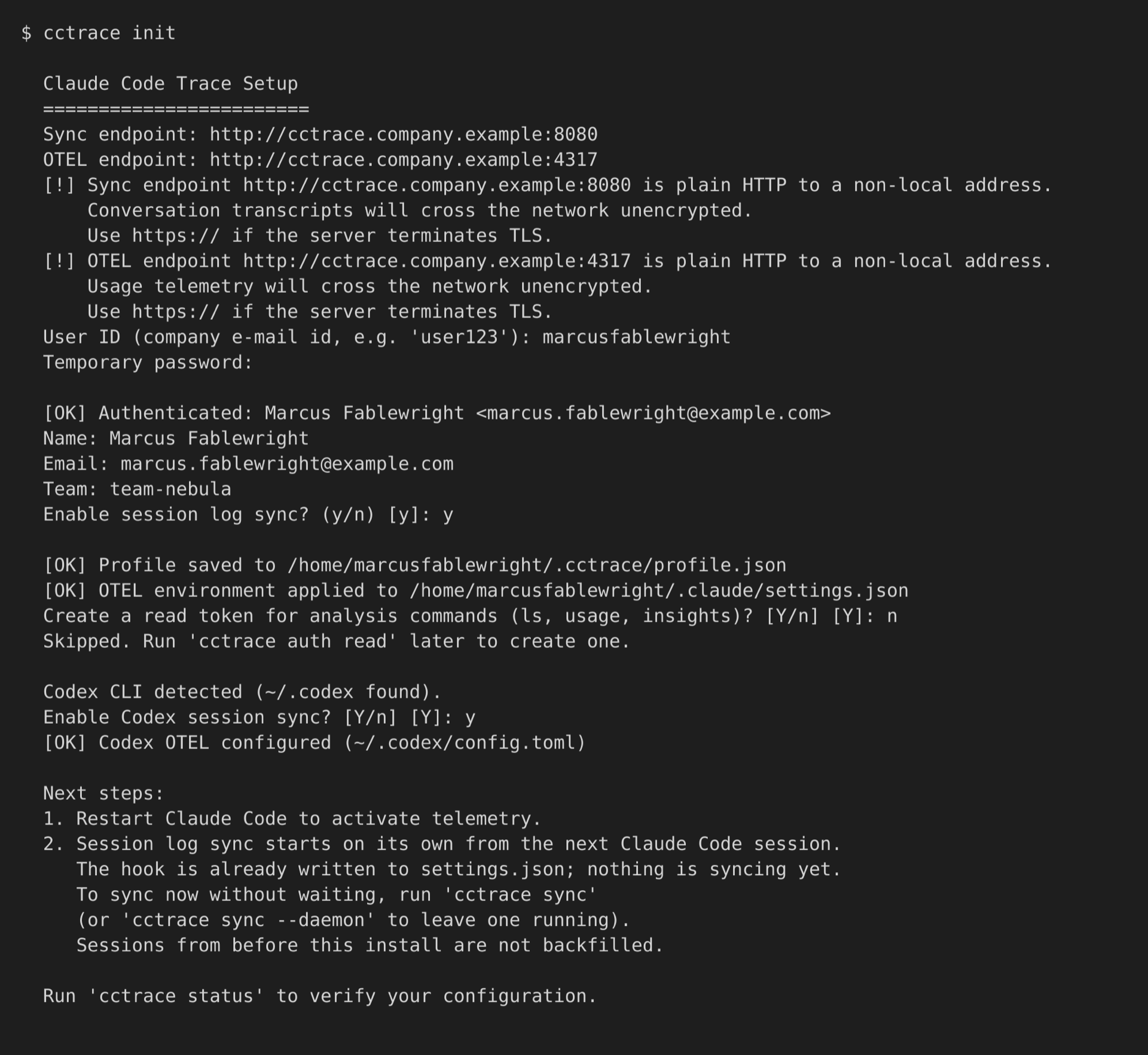
An empty endpoint is not accepted. If an endpoint is plain http:// to anything but this machine (localhost or a loopback address), init warns that transcripts or telemetry will cross the network unencrypted. Private and link-local addresses are warned about too. It does not refuse.
After authentication, init checks for other agents and asks about each one it finds:
~/.codexexists: enable Codex session sync. See Codex CLI.~/.gjcor~/.omoexists: enable GJC or OMO session sync. See GJC and OMO.
Finally, if it finds other Claude homes such as ~/.claude-work, it offers to create a profile for each. See Profiles.
What init writes
| File | Change |
|---|---|
~/.cctrace/profile.json |
Your profile: endpoints, user identity, upload token, options. Written with mode 0600. |
~/.claude/settings.json |
OTEL environment variables under env, the SessionStart and SessionEnd hooks (when sync is enabled), and a cctrace stamp object. Other keys are left as they were. See Claude Code. |
~/.codex/config.toml |
Only if you enabled Codex: an [otel] section. |
A named profile (cctrace init --profile work) is written to ~/.cctrace/profiles/work/profile.json instead, and asks one more question: which Claude config directory it belongs to.
Restart the agent
Claude Code reads the environment and hooks when a session starts, so the session you ran init from is not collected. Quit it and start a new one.
From the next session on:
- Claude Code sends OTEL metrics and logs to the OTEL endpoint.
- The
SessionStarthook starts the sync daemon, which uploads session logs.
Content already on disk at the first sync, including earlier sessions, is not uploaded. To start the daemon now instead of waiting for a new session, run cctrace sync --daemon.
Check the connection
cctrace status
status prints these sections:
| Section | Shows |
|---|---|
USER |
Name, email, user ID, team |
SERVER |
OTEL endpoint and whether it answers; sync endpoint; 서버 도달 (whether this status process reached the server) and 수집 상태 (whether the sync daemon's uploads are getting through); the start of the upload token |
PATHS |
Binary location, Claude home, Claude settings file path and whether it exists, profile directory |
OPTIONS |
Whether session log sync is on, and any redaction that is on |
NAMED PROFILES |
Each named profile, when you run status without --profile |
QUOTA |
Claude plan usage windows, fetched from Anthropic's usage API with the local Claude Code login. Unavailable on a machine that is not signed in to Claude Code; this does not affect collection. |
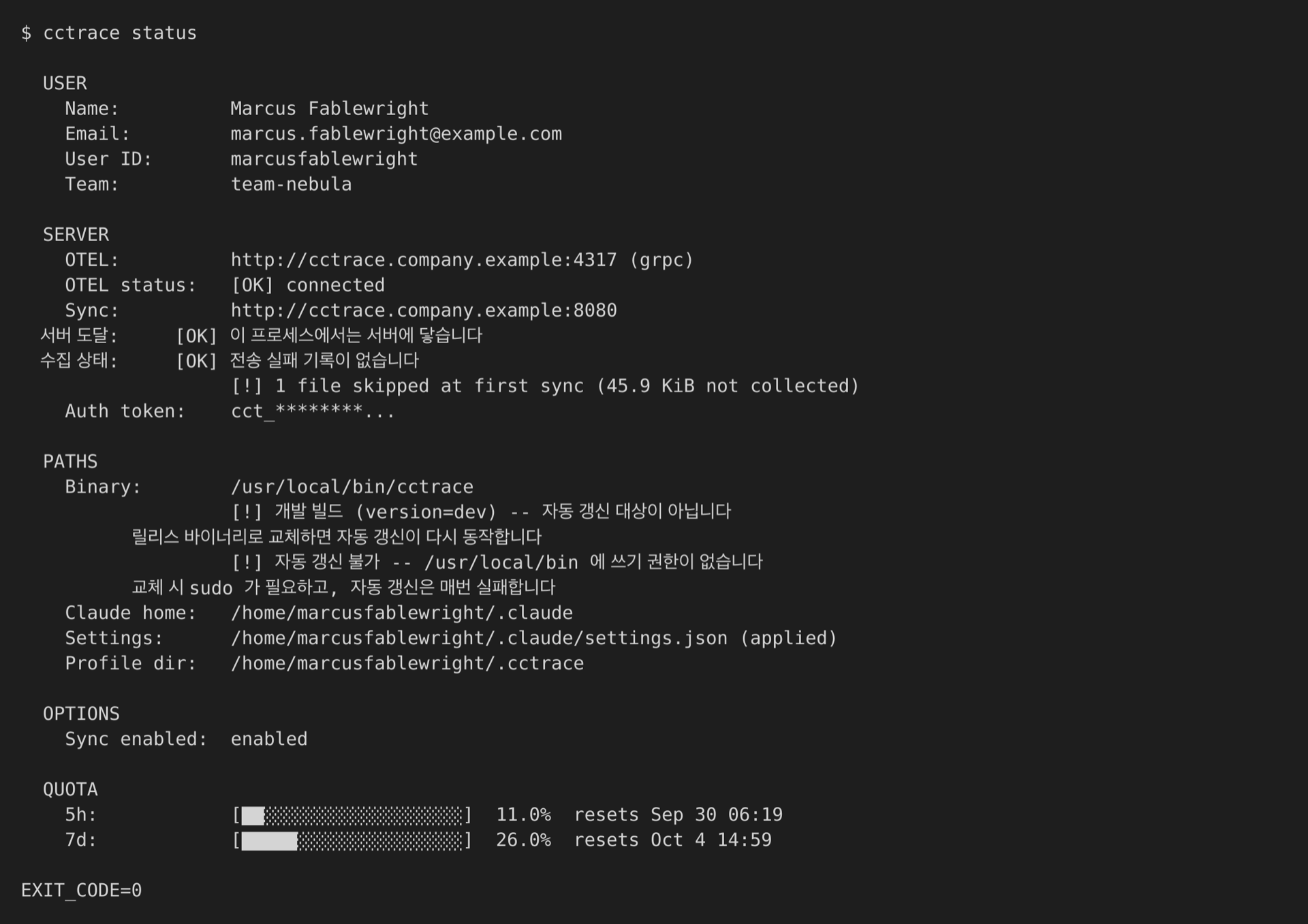
status exits with code 1 when there is no profile and code 2 when the OTEL endpoint is unreachable. Use cctrace status --profile work for a named profile.
Run init again
If a profile already exists, init offers a menu instead of starting over:
  Profile already exists: ...
    1) Patch Codex integration only (keep existing settings)
    2) Re-apply hooks and OTEL env for this binary (keep existing settings)
    3) Full re-setup (re-enter endpoint, password)
    4) Cancel
The Codex entry is listed only when ~/.codex exists; without it the other entries move up by one. Enter selects the first entry. Full re-setup backs up the profile first and restores it if setup fails.
Re-apply hooks and environment
cctrace env apply
env apply rewrites the OTEL variables and hooks in the Claude settings file (~/.claude/settings.json, or the profile's Claude home) from the saved profile, using the path of the binary you run it with. Use it after you move or replace the binary.
| Flag | Effect |
|---|---|
--profile <name> |
Apply only this named profile |
--all |
Apply the default profile and every named profile |
View and change settings
cctrace config list
cctrace config get server.sync_endpoint
cctrace config set options.codex_sync_enabled true
cctrace config with no subcommand is the same as config list. Tokens are masked in the listing. Add --profile <name> to act on a named profile.
config set saves the profile and then rewrites the Claude settings file, so a change to endpoints, identity, or options reaches Claude Code the next time a session starts. Boolean values take true or false.
server.ca_cert_file is an exception in two ways. A running sync daemon keeps the CA it started with, so after setting or clearing it, restart the daemon: cctrace sync --stop, then start it again as usual (the next Claude Code session starts it, or cctrace sync --daemon). Codex's [otel] section is rewritten with the new CA when sync next starts, not by config set. The command prints both reminders.
user.id, user.name, user.email, user.team
server.endpoint                     OTEL endpoint
server.sync_endpoint                sync (HTTP) endpoint
server.protocol                     OTLP protocol for Claude Code (default grpc)
server.auth_token                   upload token issued by init
server.ca_cert_file                 private CA (PEM) the server's certificate comes from; "" clears it
options.sync_enabled                session log sync on or off
options.redact_user_prompts         replace conversation text (prompts and replies) before upload
options.redact_tool_details         drop tool arguments and results before upload
options.codex_sync_enabled          collect Codex CLI sessions
options.gjc_sync_enabled            collect GJC sessions
options.omo_sync_enabled            collect OMO sessions
options.metrics_export_interval     OTEL metric export interval in ms (default 60000)
options.logs_export_interval        OTEL log export interval in ms (default 5000)
options.collect_repository_prefixes repository id prefixes (host/org/repo) to collect, comma-separated; empty collects all
options.codex_dirs                  extra Codex homes to scan, comma-separated
options.gjc_dirs                    extra GJC homes to scan, comma-separated
options.omo_dirs                    extra OMO homes to scan, comma-separated
The *_dirs keys accept absolute paths or paths starting with ~, and each directory must already exist. An empty value clears the list.
config list also shows keys for areas that are under active development and are not documented here.